The practical side of the protocol: see it run, read it, see two hires work together.
Working examples: one hire as it runs, then every message
The examples on this page are for anyone to read and to test in their own environment; the example files and the validator are public. The reference implementation that runs the commands is not public yet. Version 0.3 of the protocol will follow
Author Imtiaz Hassan
At a glance
| What this is | The practical side: what a whole hire looks like when it runs on one machine, the same hire message by message, two hires with a hand-off, and Jira as the hub's front desk. |
|---|---|
| You need | Python 3.10 or later and the reference implementation, which is not public yet. No accounts, no cloud, no model. |
| Status | The examples are for readers to test in their own environment. The reference implementation is not yet public. Version 0.3 will follow. |
About this document
About. The practical side of SaaCIP 0.2: what a whole hire looks like when it runs on one machine, then the same hire message by message, then two hires with a hand-off
Licence. Text CC BY 4.0; the code, when it is released, Apache License 2.0
One hire, run in a minute
You need Python 3.10 or later and the reference implementation, which is not public yet (this page will link it when it is; until then the walkthrough shows every message of the same hire and the registry every diagram, without running anything). Two terminals.
pip install -e .
saacip-hub
The hub prints two addresses: the people side at http://127.0.0.1:8470/people/, where a person creates hires, approves actions and judges findings, and the binding base at http://127.0.0.1:8470/saacip/, which a capability is given. In the second terminal:
saacip-demo --auto
What happens, in nine numbered steps printed as they run: the person at the hub creates a 14-day trial at autonomy level 2 and gets an enrolment token; a small capability enrols with its terms (ceiling 2, actions simulated, no model); it reads a made-up log file, notices an error pattern, and reports it under a ref it chose; it asks for approval to run its one declared action; the person approves; the capability collects the approval, re-checks that nothing has changed, and runs the action, simulated because the terms say dry_run; the person judges the finding real; the capability sends its final statement; the hub answers with its signed attestation; and the capability verifies every receipt it wrote and recomputes the statement from the receipts alone.
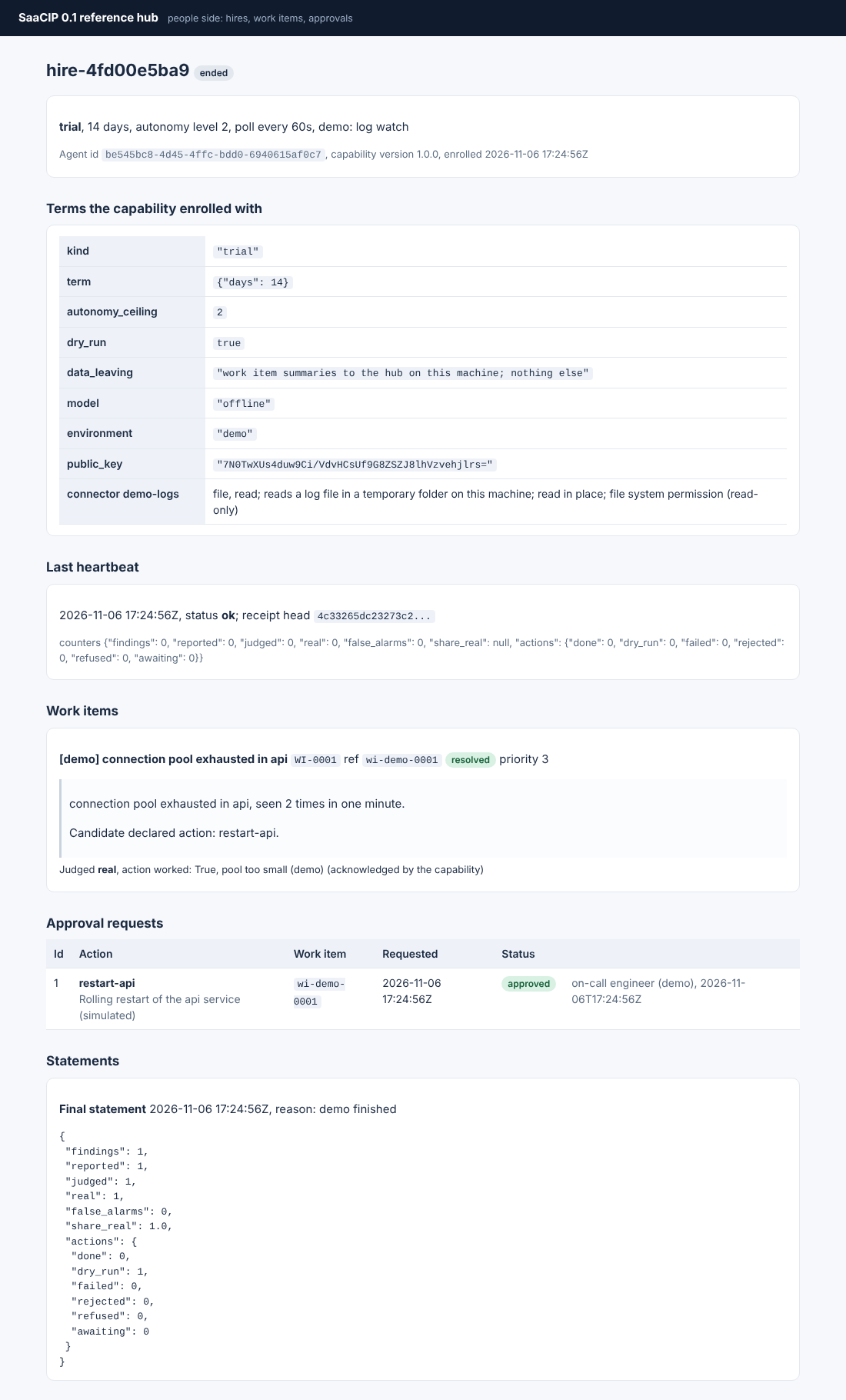
To play the person yourself, create a hire on the people page, copy its enrolment token and run saacip-demo --token enrol_...; the demo then waits for your clicks.
The same hire, message by message
The step-by-step walkthrough shows every document and message of one hire at the moment it is produced: the manifest and the declared actions file, the terms, the enrolment, the heartbeat, the report, the approval, the inbox, the action and the judgement, the statement and the attestation, and an error. Every file validates against its schema, and the receipt chain is really signed with an example key published for that purpose.
Two hires, one hand-off
saacip-demo --auto --orchestrate
A watcher hired at level 1 finds the problem and hands it to the role incident-resolution; a resolver hired at level 2 holds that role, takes the item up, asks approval and runs the action. Neither knows the other exists. Capability orchestration has the sequence diagram and the receipts of both sides.
One diagram per capability
The registry lists five worked capabilities, and each entry carries the sequence diagram of its own hire: the same seven calls, with that capability's findings, its declared action and the words its outcomes are judged in. Read two of them side by side and the claim "one protocol, any job" becomes visible.
Use Jira instead of the hub's pages
export JIRA_API_TOKEN=...
saacip-hub --jira-url https://example.atlassian.net --jira-user <your Jira login> --jira-project OPS
Every work item becomes an issue, every approval request an issue of its own, and people decide by commenting saacip: approve, saacip: reject, saacip: real or saacip: false_alarm. The hub's record stays in SQLite; Jira is where people look. This is the first adapter; the sink interface it implements is where the next ones plug in.
The views here are the author's own.
Important notice. This page is part of my ongoing research into the Agentic Economy and reflects my thinking at the time of writing. It is shared in good faith, for information and discussion. It is not legal, regulatory, technical, financial or other professional advice, and it is not a verdict on how the EU AI Act or any other law applies to any organisation, system or situation. Laws, guidance, technology and my own research all move on, and others may reach different conclusions. The examples, designs, diagrams and technology choices show one possible approach. Before relying on, adapting or applying any part of it in your own situation, you must test and verify it, design it for your own architecture, and take independent expert advice, including from qualified lawyers and from your own IT, security and data protection specialists. Any decision to act on it, and its consequences, rest with you. To the fullest extent permitted by law, the author accepts no responsibility or liability for any loss, damage or consequence arising from any use of, or reliance on, this page, which is provided without any warranty of accuracy, completeness or fitness for a particular purpose. Reading it does not create a professional or advisory relationship with the author. The views expressed are the author’s own.